
How To Add Daily Quote Widget to iPhone Home Screen & Why You Absolutely Should
So, we’ve told you we’re committed and having built you the Daily Quote app, which currently has the iOS version only, allows you to receive daily motivation and inspiration quotes to help you going with your day.
We are constantly talking about the power of positive thinking and the game-changing habit of daily affirmations. But let’s be honest: in the chaos of daily life, it’s easy for that commitment to slide. You might forget to open the app, or that carefully chosen mantra gets lost in your phone’s endless notification feed.
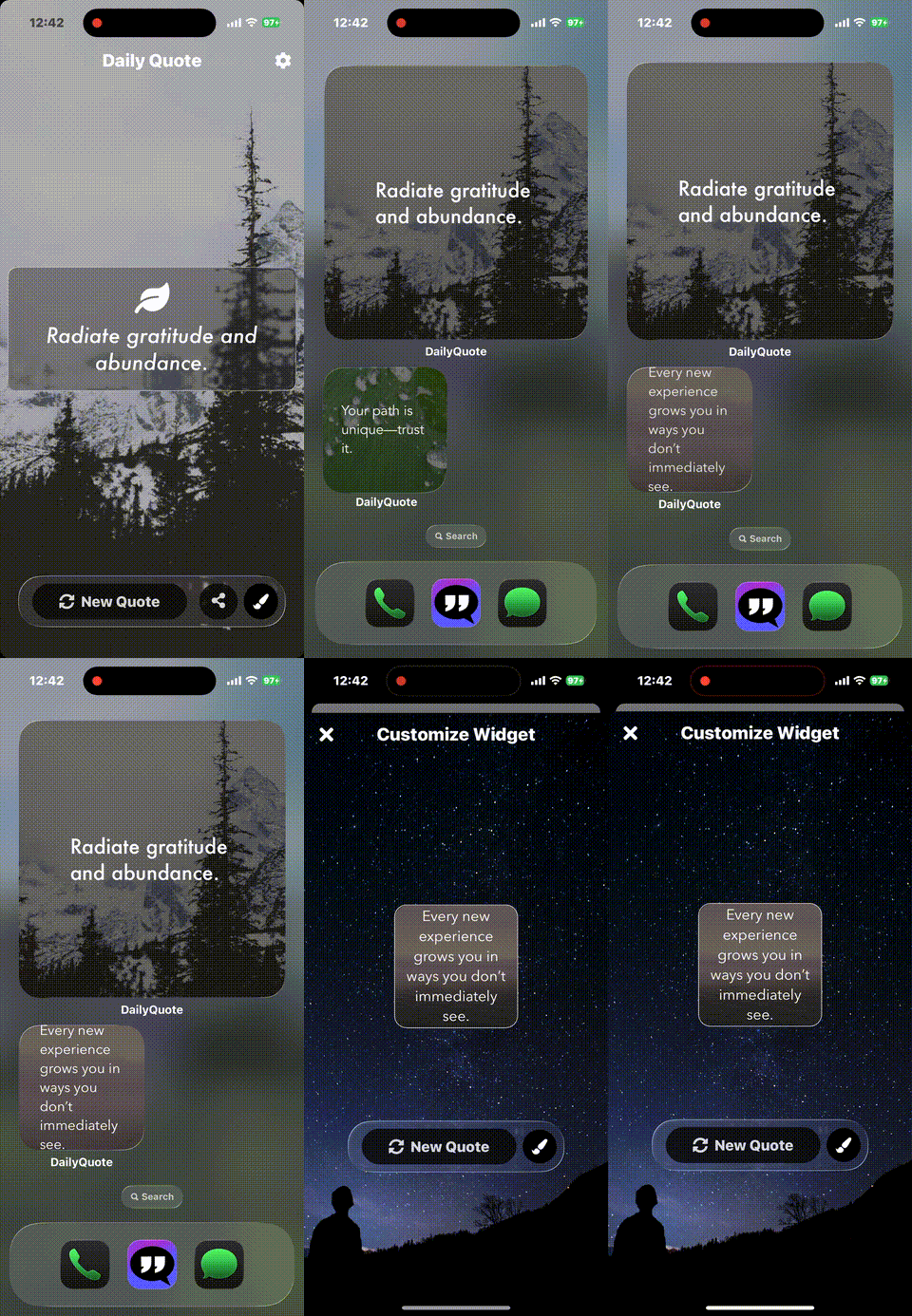
That’s why we’re obsessed with the magic of the Daily Quote Widget (as shown in the screenshots below). It’s not just a feature; it’s a commitment to making your mental well-being effortless.
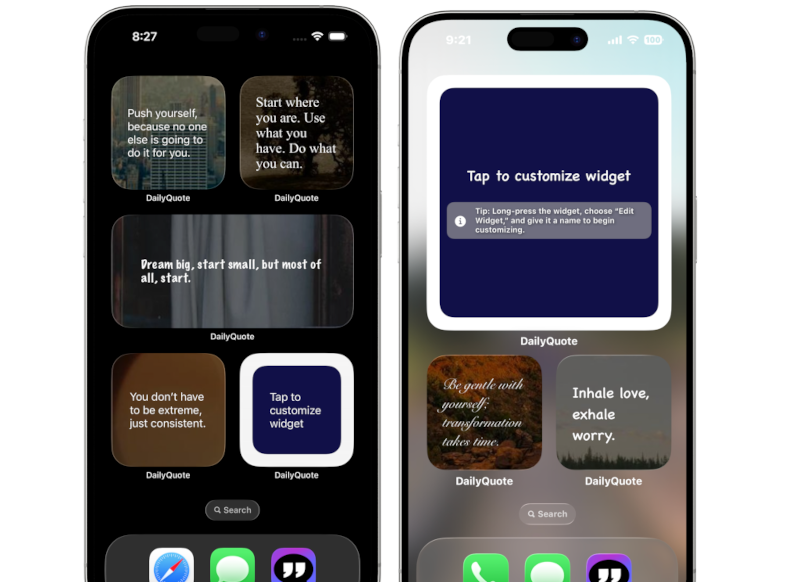
Imagine this: You unlock your phone in the morning, still half-asleep, dreading the mountain of emails or the day ahead. But instead of just app icons, your eyes land on a beautiful, aesthetic card embedded right in your home screen, whispering: “You are capable of amazing things. Go get ’em.”
That tiny shift, that split second of positive reinforcement, can genuinely change the trajectory of your entire day. It’s about building a digital environment that doesn’t just hold your apps but actively uplifts your spirit.
The Power of Passive Positivity: Why Widgets Keep You Going
We spend so much time looking at our phones. Why not make that screen time work for us, rather than just being a distraction? Here’s why adding a daily quote widget isn’t just a trend, it’s a game-changer for your mindset:
- Passive Affirmation: You don’t have to open an app or search for a quote. The wisdom is just there, passively seeping into your subconscious every time you glance at your phone. It’s truly effortless self-care.
- Instant Mood Boost: A well-timed, positive message can literally shift your perspective in seconds. Feeling overwhelmed? A reminder to “breathe and be present” can bring you back to earth, instantly.
- Mindful Digital Habit: Instead of mindlessly scrolling, a beautiful quote widget serves as a micro-moment of mindfulness. It encourages you to pause, reflect, and internalize positive thoughts.
- Aesthetic Inspiration: A visually pleasing home screen just feels good. Pairing powerful words with the aesthetic backdrops in the DailyQuote app turns your phone into a personalized art gallery of inspiration.
- Personalized Motivation: Whether you need a push for productivity, a reminder for self-love, or just a burst of general positivity, our two types of widgets—the Daily Refresh Widget and the Fully Customizable Widget—give you complete control over what you see, when you see it.
So, this isn’t just about decor; it’s about making your tech support your mental health and personal growth journey.
Your Step-by-Step Guide: How to Add Daily Quote Widgets on iOS
For this guide, you’ll need the DailyQuote Motivation App, available soon on the iOS App Store! You can check it out here.
Here’s how to get your daily inspiration glowing on your iPhone home screen:
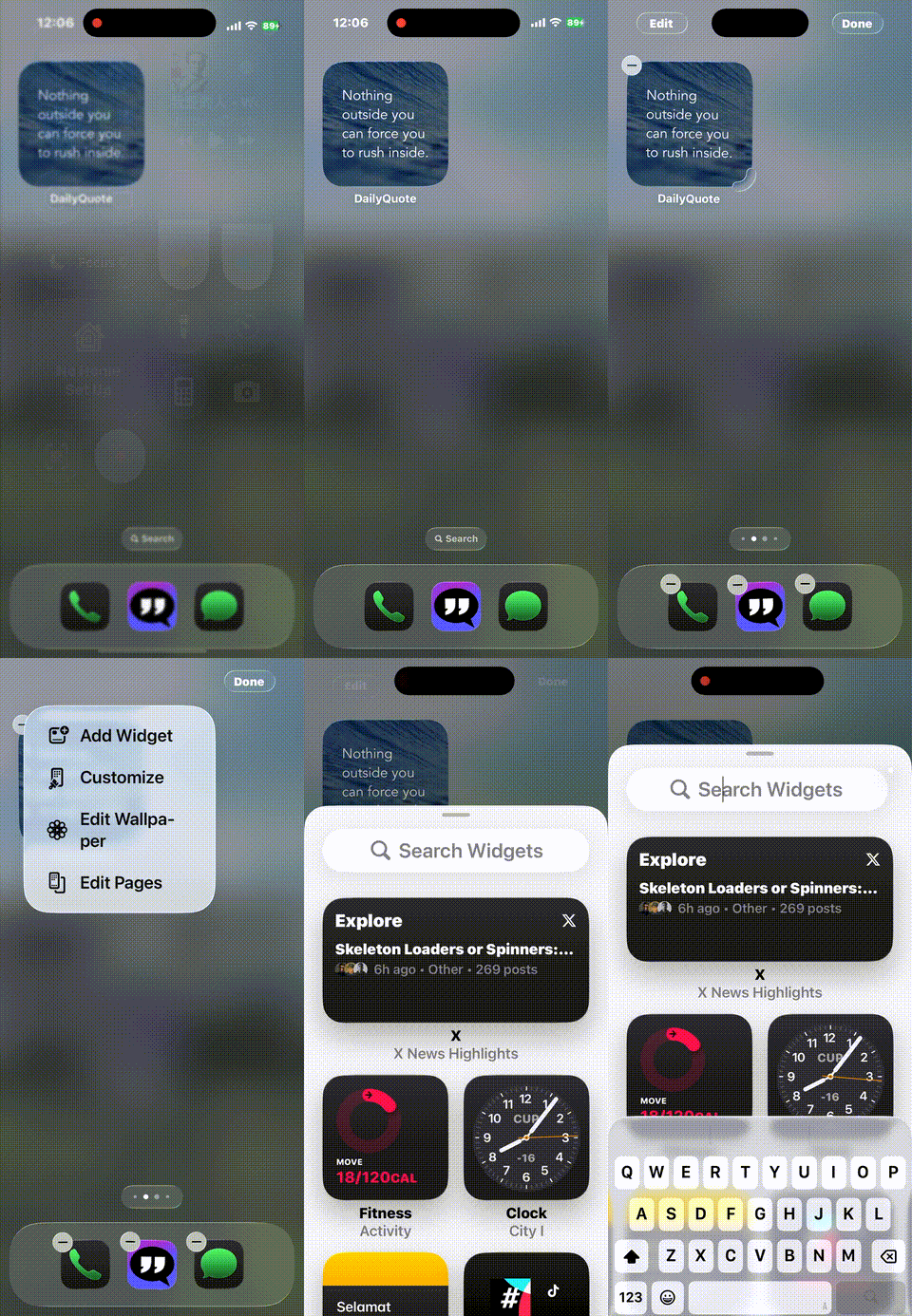
- Enter Jiggle Mode: Find an empty spot on your iPhone home screen where you’d like your widget to live. Tap and hold down on any empty area of your home screen until all your app icons start wiggling. This means you’re in “edit mode.”, as shown in the animated GIF below:
- Tap the Plus Sign: Look for the “Add Widget” in the menu in the top left corner of your screen (or top right). Tap it to open the Widgets gallery. As shown in the animated gif below:
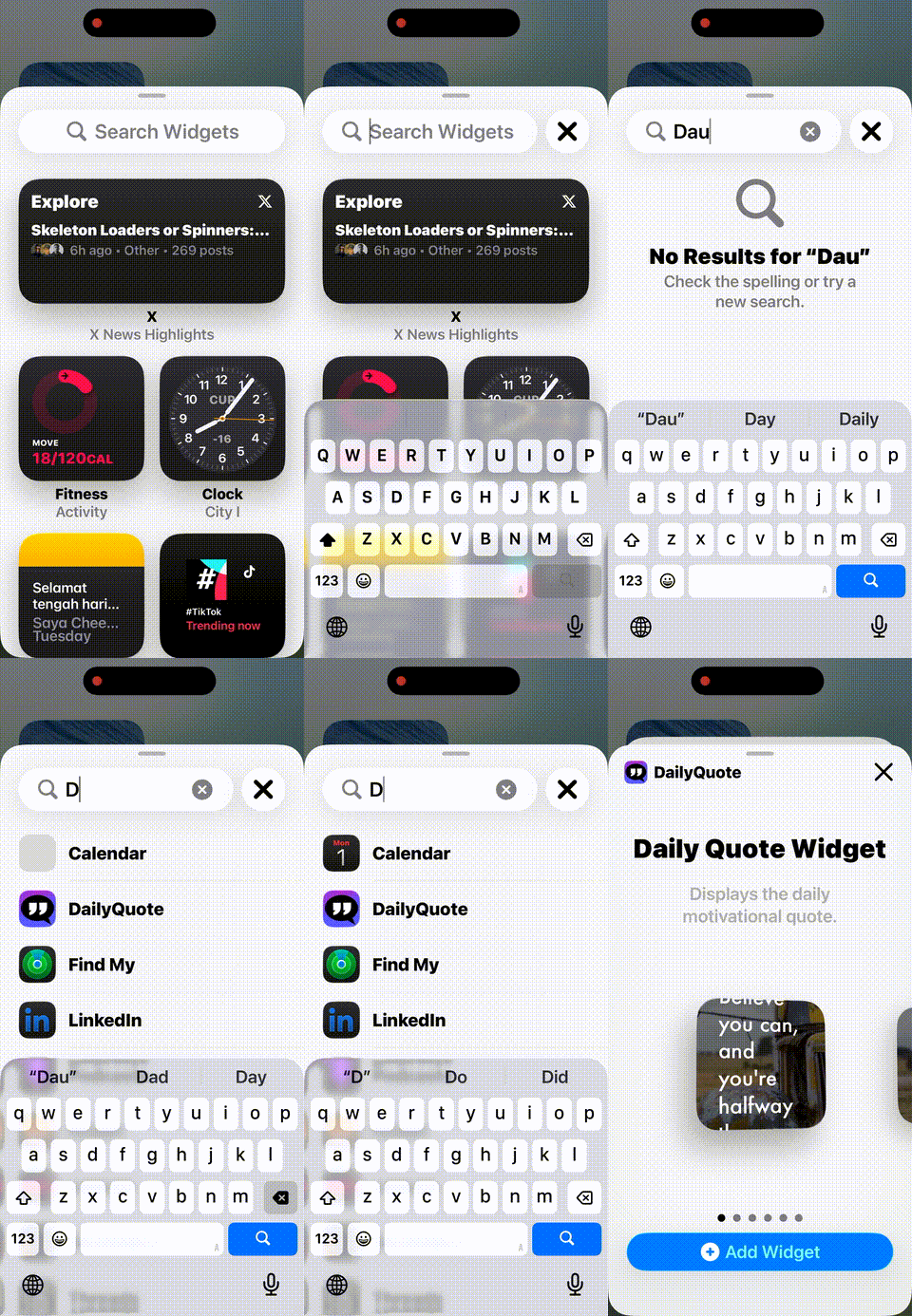
- Find “DailyQuote”: In the search bar at the top of the Widgets gallery, type “DailyQuote” or scroll down the list until you find our app icon, as shown in the animated GIF below:
- Choose Your Widget Type & Size: Once you select “DailyQuote,” you’ll see options for different widget sizes (Small, Medium, Large) and our two widget types:
- Daily Refresh Widget: This option automatically updates with a new quote and aesthetic backdrop from our 1000+ library every single day. Perfect for passive, surprise motivation!
- Customizable Widget: This option lets you select and lock in a specific, powerful quote (like your current mantra) so it stays visible until you decide to change it.
- Pro-Tip: We highly recommend adding multiple widgets of different sizes and types across your screens to create a comprehensive positivity cluster!
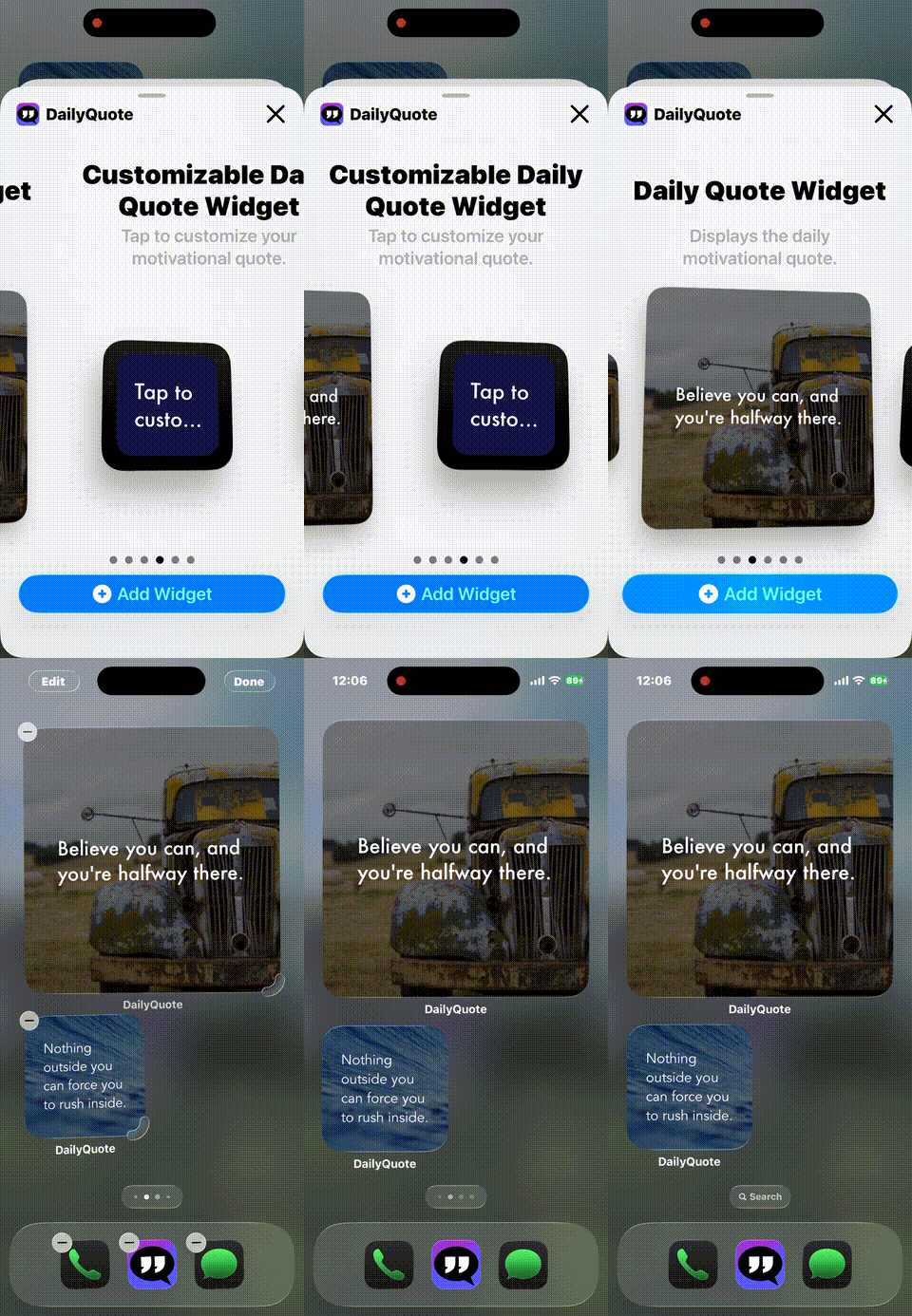
- Add Widget: Choose the size and type you want, then tap “Add Widget” at the bottom of the screen.
- Exit Jiggle Mode: Once you’re happy with its placement and customization, tap “Done” in the top right corner.
- Customize (Crucial Step for Custom Widgets):
- If you chose the Customizable Widget, while your apps are still jiggling, simply tap on the newly added DailyQuote widget. This will open a small pop-up where you can get new quote by pressing “New Quote” from our vast library to keep front and center. Or customize the font size, colors and background wallpaper etc, as shown below:
Beyond the Widget: Maximizing Your DailyQuote Experience
The widget is just one part of the ecosystem we built to keep you uplifted. Remember, the DailyQuote app also lets you:
- Schedule Notifications: Set specific times (morning, mid-day, evening) in DailyQuote App’s settings to receive a fresh quote, ensuring motivation hits exactly when you need it most.
- Create Aesthetic Lock Screens: Every quote comes with a gorgeous wallpaper. You can save these quotes as high-resolution “cards” in various sizes (Square, Portrait, Wallpaper) to set as your iOS Lock Screen, ensuring your phone’s very first glance is inspiring.
By combining the passive affirmation of the widget with the active scheduling of notifications, you create a holistic motivational system right on your iPhone. You’re not just relying on a random quote; you’re setting up your day for intentional positivity.
Ready to infuse your iPhone with daily inspiration and make every glance count? Get ready to download the DailyQuote Motivation App when it officially launches!
What quote will you lock onto your home screen first? Share your favorite mantra in the comments!